That is why I like the FPL Demon Good Pick tool. It gives me a simple way to ask the question I actually care about: is this player a good pick for my team, my budget and this gameweek?
I use it inside the FPL Planner. I open a player, choose the gameweek I am planning for, ask Demon for a read, and then I get the decision in one place: expected points, value, xMins, fixtures and alternatives.
My First Rule: Stop Guessing From One Fixture
I do not use Good Pick as a magic yes-or-no button. I use it to slow myself down. If I am tempted by a player because he has one good fixture, I open him in the Planner and make Demon check the run.
That is the useful bit. Good Pick does not just tell me whether a player sounds exciting. It puts him beside alternatives in the same position and shows me the numbers I would normally have to collect from three or four different places.
| Question | Why it matters | How I use it |
|---|---|---|
| Is he worth buying now? | A good player can still be a bad transfer if the timing is wrong. | I check him in the exact GW I want to buy. |
| Is there a stronger alternative? | You are never choosing in a vacuum. You are choosing against every other player at that price. | I compare him against same-position alternatives. |
| Does he have the minutes? | Projected points collapse if the player is not expected to play enough. | I edit xMins when I disagree with the default assumption. |
| Is the value good? | A cheaper player with similar xPts can unlock a stronger squad elsewhere. | I use value to spot cheaper routes that still score well. |
| Does the pick work later? | A GW1 pick can become a GW3 problem. | I flip through future gameweeks before saving the draft. |
Step 1: Build Or Load Your Draft In The Planner
I start in the FPL Planner. I build the squad, move through the gameweeks and check how the team looks after the transfers I am already thinking about.
Good Pick is much better when it is reading a player inside my actual draft. If I am replacing a defender, I want alternatives that make sense for that slot. If I am replacing a midfielder, I want to know what the budget looks like after the sale. If I am planning a wildcard route, I want to know whether the player still looks good in GW4, GW5 and GW8.
That is why I do not treat Good Pick like a random player rating. I treat it like a decision check inside my team.
Step 2: Open Any Player And Ask The Right Question
Once I have a player in the draft, I click him and use the Good Pick button. The question is deliberately simple: is this player a good pick?
That sounds basic, but it saves me time. Instead of opening the fixture ticker, expected points, ownership, prices and player stats separately, Good Pick pulls the decision into one view.
- For defenders, I look for clean-sheet route, defensive contribution upside, xGI and minutes.
- For midfielders, I look for xPts, xGI, value and whether a cheaper player is close enough.
- For forwards, I care most about xG route, expected minutes and captaincy upside.
- For goalkeepers, I check fixtures, save volume and whether the clean-sheet path is real.
Step 3: Use The Horizon Buttons Properly
One of my favourite parts is switching the horizon. A player can look great for one week and average over five. Another player can look quiet in the next gameweek but become the better pick over eight.
I use Next GW for a one-week punt. I use Next 3 for short transfer plans. I use Next 5 for normal buys. I use Next 8 when I am judging wildcard structure or players I want to hold for a run.
| Horizon | Best for | My rule |
|---|---|---|
| Next GW | One-week punts, captain thoughts, emergency transfers | Useful, but I do not let one fixture trick me. |
| Next 3 | Short fixture swings and quick transfers | Good when I am being aggressive. |
| Next 5 | Most normal FPL transfers | This is my default view. |
| Next 8 | Wildcard drafts and longer-term structure | I use this before locking players I plan to keep. |
Step 4: Edit xMins When You Know Something Has Changed
Good Pick becomes much more powerful when I use xMins properly. Sometimes the default projection is fine. Sometimes I know something has changed: an injury, a press conference, a suspension, a new signing, or a player suddenly becoming first choice.
If I think a player will start and play 85 minutes instead of 65, I change it. If I think a player is a rotation risk, I lower it. Then Good Pick picks up that assumption when I ask for the verdict.
That is what makes it feel useful to me. I am not just accepting a static rating. I can make the tool think with my assumptions, then see whether the pick still holds up.
- If a defender becomes nailed because of an injury, I raise the xMins and check whether he becomes viable.
- If a winger has rotation risk, I lower the xMins and see if the pick survives.
- If a forward is returning from injury, I test the lower-minutes version before buying.
- If I am planning future gameweeks, I edit the specific GW I care about instead of assuming every week is the same.
Step 5: Move Between Expected Points And The Planner
I do not only live in the Planner. I usually start with the Expected Points board when I want to scan the whole player pool. That is where I find names, price points and interesting fixture runs.
Then I come back to the Planner and use Good Pick on the players I am actually considering. Expected Points helps me find the candidates. Good Pick helps me decide whether the candidate belongs in my team.
- I open Expected Points and scan the GW columns.
- I sort or search for players in my price range.
- I click a player if I want the breakdown for that gameweek.
- I go back to the Planner and place the player in my draft.
- I open the player modal and ask Good Pick.
- I compare the verdict against the alternatives before I save the draft.
Step 6: Use Good Pick In Future Gameweeks, Not Just GW1
This is where I think most casual managers lose value. They judge a player today and forget that FPL is a route game. A player might be a good pick in GW2, a bad pick in GW4 and a sell in GW6.
In the Planner, I flip from GW1 to GW2, GW3, GW4 and beyond. Then I open the same player in different weeks. That lets me ask much better questions.
- Is this player still a good pick after the fixture swing?
- Should I buy him now or wait one gameweek?
- Does this defender survive the bad away fixture?
- Is this midfielder a hold through the next five or just a short punt?
- If I make this transfer in GW3, does it improve my GW5 team too?
That is the real edge. Good Pick is not only for deciding who to buy today. I use it to plan any player, in any gameweek, inside the route I am building.
A Real Example Of How I Use It
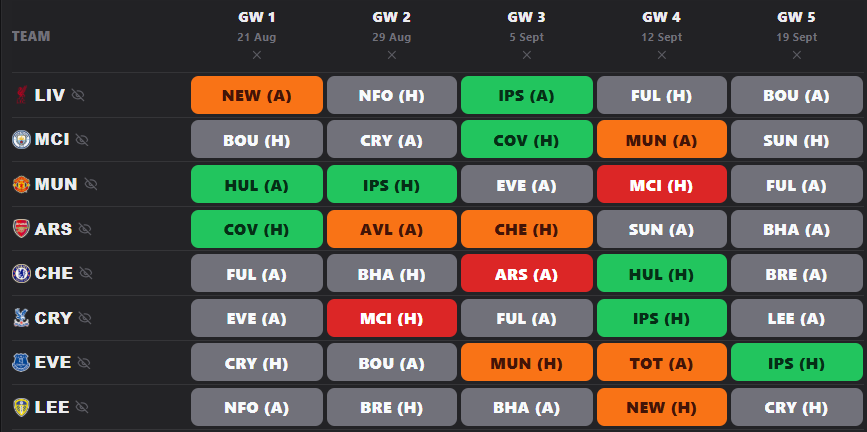
Say I am looking at a defender with a friendly opening fixture. In the past, I might have bought him because the fixture looked green and the price was useful.
Now I open him in the Planner and ask Good Pick. Demon shows me his next-run xPts, value, xMins and FDR, then puts him next to alternatives. One alternative might have a slightly tougher first fixture but stronger expected points over the next five. Another might have worse xPts but better value, which matters if I need money for a midfielder.
That changes the decision. I am no longer asking, Do I like this defender? I am asking, Is this defender the best use of this slot and budget over the route I am actually planning?
When Good Pick Says No, I Listen To Why
A no is not the tool trying to be clever. It usually means one of three things: the minutes are shaky, the fixture run is not as good as it looks, or the alternatives are giving me more for the money.
I do not always obey the verdict blindly. Sometimes I still pick the player because I want the upside. But then I know what risk I am taking. That is the difference between a fun punt and a blind punt.
| Verdict | What I do next | Manager move |
|---|---|---|
| Strong pick | I check if the player fits my route and budget. | Buy or hold with confidence. |
| Good pick | I compare him against the closest alternatives. | Fine pick, but I still check value. |
| Watch | I check minutes and future fixtures. | Wait unless I need the move now. |
| Risky | I look at xMins and role before buying. | Only buy if I accept the risk. |
| Avoid or sell | I find the alternative with the clearest route. | Do not force the pick because of name value. |
Why This Helps You Win Mini-Leagues
Mini-leagues are usually won by managers who make fewer lazy decisions. They do not just buy last week's points. They do not hold a player for three bad fixtures because he has a big name. They do not waste transfers on players who were never likely to play enough minutes.
Good Pick helps because it turns every transfer thought into a proper check. I can ask it on my captain, my defender, my bench cheapie, my wildcard punt, my transfer target, or the player I am about to sell.
- Use it before buying a player.
- Use it before selling a player.
- Use it before locking a wildcard draft.
- Use it when a player is flagged but might still start.
- Use it when you are choosing between two players at the same price.
- Use it when your gut likes a pick but the route might not.
My Good Pick Routine
- I build the draft in the Planner.
- I check the team in GW1.
- I open the key players and ask Good Pick.
- I switch to Next 5 for normal transfer decisions.
- I switch to Next 8 for wildcard or long-term holds.
- I edit xMins if I disagree with the minutes.
- I go to Expected Points to find alternatives.
- I come back to the Planner and compare the shortlist.
- I flip future gameweeks before saving the draft.
My Verdict
Good Pick is not there to replace your brain. It is there to stop your brain from skipping steps. Use it to check the player, the gameweek, the minutes, the value, the fixture run and the alternatives before you spend a transfer.
That is how I use it. Not as a yes-or-no button, but as a decision engine inside my Planner. If you use it that way, you will catch more traps, spot more value and build cleaner routes before your rivals even realise the swing is coming.