FPL
How To Use The FPL Demon Draft Compare Tool To Win
5 August 2026
I finished inside the top 1k last season, and the biggest change in my game was not chasing more information. It was comparing my actual plans properly before deadline.
Most FPL managers do compare players. Fewer compare routes. That is the mistake. A transfer is not only one player against another player. It changes your captain, your bench, your chip timing, your bank and the team you land on three or five gameweeks later.
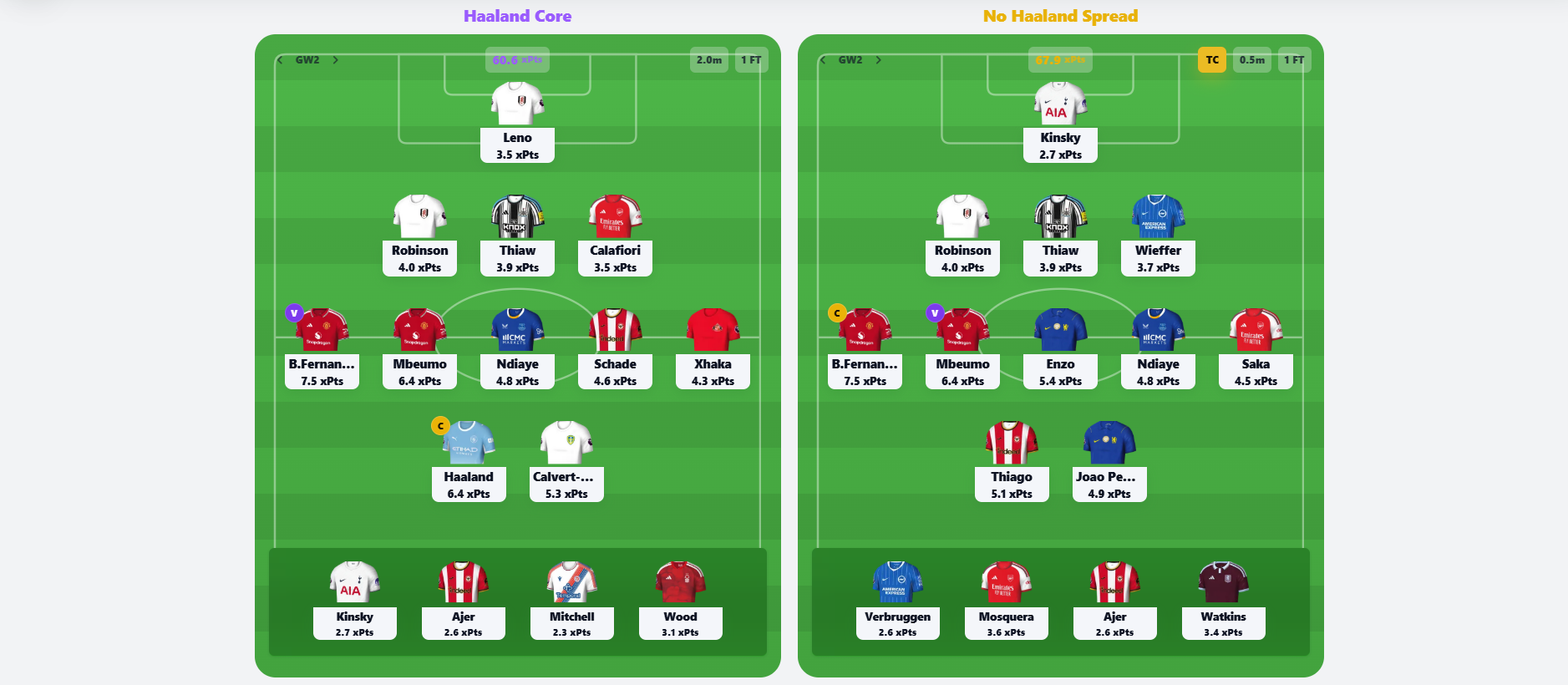
That is why I use Draft Compare inside FPL Demon. I build two drafts in the Planner, save them, then put them side by side. One might be a Haaland route. One might be a No Haaland route. One might attack GW1. One might hold transfers for GW3. Draft Compare shows me which route is actually stronger, not just which team looks prettier today.
The Way I Think About Draft Compare
I do not use Draft Compare as a screenshot tool. I use it as a decision tool. If I am stuck between two structures, I want to see the points, minutes, captains, chips and transfers in one place.
The key is that both drafts need to be real plans. I do not compare a finished draft against a random idea. I compare two routes I would actually be willing to play.
| Question | Why it matters | How I use Draft Compare |
|---|---|---|
| Which route scores more? | A team can look strong in GW1 but fall behind by GW4. | I check xPts by gameweek and total. |
| Which route has better captains? | Captaincy is where small differences become big swings. | I use Captain Difference to spot the weeks that matter. |
| Which route uses chips better? | A chip in the wrong week can make the route look better than it is. | I check chip timing separately. |
| Which route needs more transfers? | A high-scoring draft can be fragile if it needs too many moves. | I open Transfer Differences and check the plan week by week. |
| Which route has safer minutes? | Rotation kills planned points. | I look at xMins when I am worried about starts. |
Step 1: Build Two Drafts With A Clear Idea
I usually start in the Planner with one main draft. Then I duplicate the idea mentally and build the alternative. The two drafts should answer a real FPL question.
- Haaland or No Haaland?
- Premium defence or premium midfield?
- Triple Arsenal or spread the money?
- Bruno captain route or Haaland captain route?
- Save money in defence or pay for clean-sheet security?
- Wildcard early or hold the structure?
That is the first discipline. I name the drafts properly so I know what I am testing. I do not call them Draft 1 and Draft 2. I call them things like Haaland Core, No Haaland Spread, Arsenal Defence, Bruno Captain Route or Early Wildcard.
Step 2: Compare The Route, Not Just GW1
The biggest trap in pre-season is falling in love with the first screenshot. A GW1 team can look beautiful and still be awkward by GW3. Draft Compare makes me look past that first screen.
I start with the xPts Difference table. I want to know where each draft wins. If Draft A is ahead in GW1 but Draft B wins GW3, GW4 and GW5, that changes how I feel about the risk.
| Pattern | What it tells me | My reaction |
|---|---|---|
| One draft wins early only | It might be a short-term fixture attack. | I check whether I have an exit transfer planned. |
| One draft wins every week | The structure is probably stronger. | I ask what risk the model might be missing. |
| The total is close | The decision might come down to captaincy or flexibility. | I open Captain Difference and Transfer Differences. |
| The gap is huge in one GW | A chip, captain or fixture swing is probably driving it. | I inspect that gameweek before trusting the total. |
Step 3: Use Captains As The Tie-Breaker
When two drafts look close, captaincy usually decides it. I have seen plenty of drafts where the starting XI difference is tiny, but the captain route is completely different.
If one draft gives me a better captain in three of the next five gameweeks, I take that seriously. I especially care about weeks where one route has a premium captain at home and the other route is forcing a weaker armband.
This is also where Triple Captain planning becomes useful. I do not want to play Triple Captain just because I own a big name. I want to know whether that week is genuinely one of the strongest captain spots in the route.
Step 4: Check Chip Timing Separately
Chips can lie to you if you only look at total xPts. A Bench Boost week can make a route look amazing, but if the bench is only strong because I have trapped money there, the plan might not be worth it.
In Draft Compare, I check chip timing on its own. If one route uses Bench Boost, I look at the bench. If one route uses Triple Captain, I check the captain. If one route uses Wildcard, I ask whether the team after the wildcard is better for the next five, not only that week.
| Chip | What I check | What I want to see |
|---|---|---|
| Triple Captain | The captain's xPts in that GW | A clear captain spike, not a forced play. |
| Bench Boost | The bench xPts and minutes | Four players with real minutes and useful fixtures. |
| Wildcard | The team after the wildcard | A stronger five-gameweek route, not just a prettier XI. |
| Free Hit | The one-week swing | A specific GW where the normal team is weak. |
Step 5: Open Transfer Differences Before You Trust The Winner
This is where Draft Compare saves me from myself. A route can win on projected points but need awkward transfers every week. Another route might score slightly less but be cleaner, cheaper and easier to manage.
I open Transfer Differences and read it like a plan. GW2, GW3, GW4, all the way through the route. If I see transfers that I would not actually make, the draft is not real yet.
- If a route needs two transfers early, I ask whether I am already booking myself into a problem.
- If a route sells a player before a good fixture, I check whether that is really worth it.
- If a route relies on perfect timing, I treat it as fragile.
- If a route has fewer moves and similar xPts, I usually prefer the cleaner plan.
Step 6: Use Expected Points To Find The Players, Then Draft Compare To Choose The Route
Expected Points is where I go hunting. I scan the board, look across GW1 to GW10, click players for breakdowns and find names that deserve a place in a draft.
Then I go back to the Planner and build the route. That is important. A player can look good on the Expected Points board and still not fit my draft. Price, transfers, captaincy and team structure matter.
- I open Expected Points and scan the strongest routes.
- I shortlist players by position and price.
- I click xPts cells to see the breakdown for the gameweek.
- I move the shortlist into the Planner.
- I use Good Pick on the awkward player decisions.
- I save two drafts.
- I open Draft Compare and choose the route.
Step 7: Use Good Pick For The Player Calls Inside Each Draft
Draft Compare tells me which plan is stronger. Good Pick helps me fix the weak spots inside the plan.
If Draft A is winning overall but has a defender I am unsure about, I click that defender in the Planner and ask Good Pick. Demon checks his xPts, value, xMins, fixtures and alternatives. Sometimes the draft is good, but one player inside it is not the best use of the slot.
That is how I link the tools. Expected Points gives me the player pool. Good Pick checks individual decisions. Draft Compare tells me which saved route I should actually play.
Step 8: Edit xMins When The Model Needs Your Assumption
xMins matters because Draft Compare is only as useful as the assumptions behind the route. If I think a player is more nailed than the default projection, I edit him. If I think he is a rotation risk, I lower him.
Then I compare again. That is the premium bit for me. I am not just looking at a static table. I am testing the route with the assumptions I actually believe.
- If a defender becomes first choice because of an injury, I raise his xMins and compare again.
- If a winger might get benched after Europe, I lower his xMins and see if the draft still works.
- If a forward is returning from injury, I test a lower-minutes version before trusting the route.
- If the captain is a minutes risk, I check whether the alternative draft becomes safer.
A Real Way I Would Use It Before GW1
Say I am stuck between a Haaland draft and a No Haaland draft. The Haaland draft gives me an obvious captain and a safer premium forward slot. The No Haaland draft spreads money into midfield, defence and bench strength.
I save both drafts. Then I compare them. If the No Haaland route wins total xPts but loses captaincy in the key weeks, I do not blindly pick it. I check the captain table. If the Haaland route wins GW1 but needs ugly transfers in GW3 and GW4, I check Transfer Differences. If the No Haaland route has a stronger Bench Boost, I check whether the bench really has minutes.
That is the decision I want. Not Haaland or no Haaland as an opinion. Haaland or no Haaland as a 10-gameweek route.
What I Do When The Two Drafts Are Close
If the total is close, I do not panic. Close drafts are normal. That usually means the decision is not about raw points alone. It is about risk, captaincy, transfers and how comfortable I am managing the team.
| Tie-breaker | Why I care | What I usually choose |
|---|---|---|
| Better captain route | Captaincy creates the biggest weekly swings. | The draft with cleaner captaincy. |
| Fewer forced transfers | I want flexibility when real news arrives. | The route with fewer booked moves. |
| Stronger xMins | Minutes are the floor of every projection. | The draft with fewer rotation risks. |
| More flexible bank | Money in the bank makes future moves easier. | The draft that can react to price points. |
| Cleaner chip plan | A chip should improve a good route, not rescue a bad one. | The draft with the more natural chip timing. |
Why Draft Compare Helps You Win Mini-Leagues
Mini-leagues are not only won by finding good players. Everyone can see good players. The edge is building cleaner routes than the managers around you.
Draft Compare helps because it stops me from choosing a draft based on emotion. If I like a team because it has exciting names, the table can humble me. If I hate a team because it feels boring, the route might show me it is quietly stronger.
- Use it before locking your GW1 squad.
- Use it before wildcarding.
- Use it before selling a premium.
- Use it when deciding whether a hit is worth it.
- Use it when planning Triple Captain or Bench Boost.
- Use it when you have two drafts and both feel right.
My Draft Compare Routine
- I scan Expected Points for the player pool.
- I build my first draft in the Planner.
- I create a second draft that tests the opposite structure.
- I name both drafts clearly.
- I use Good Pick on any player I am unsure about.
- I edit xMins where I have a strong minutes opinion.
- I compare xPts, captains, chips, xMins and transfers.
- I choose the route that scores well and is easiest to manage.
- I save the final draft and stop tinkering unless real news changes the assumptions.
My Verdict
Draft Compare is not there to make FPL automatic. It is there to make your thinking sharper. The tool does not just ask which squad looks better. It asks which route survives the next 10 gameweeks.
That is how I use it as a top-1k manager. I find players on Expected Points, test the awkward ones with Good Pick, build two real drafts in the Planner, then use Draft Compare to choose the route. If you do that before deadline, you are not just picking players. You are planning the season in front of the managers you are trying to beat.