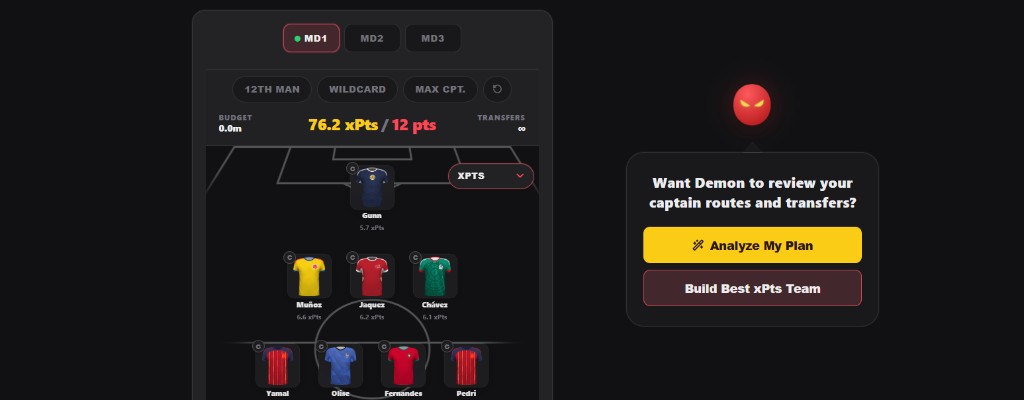
The FPL Demon World Cup Fantasy Planner is built for one job: helping you see your whole tournament plan before you burn transfers, captains or chips. Instead of looking at one player in isolation, the planner lets you compare your squad across MD1, MD2, MD3 and the Round of 32 all the way to the final.
This guide explains how to use the planner properly: importing your FIFA Fantasy team, reading the player dropdowns, using Rate My Team, checking transfer ideas, planning captains, preparing R32 and using the Chip Solver for Qualification Booster and Clean Sheet Shield decisions.
Quick Planner Overview
| Feature | What it does | Best time to use it |
|---|---|---|
| Import FIFA team | Loads your current fantasy squad into the pitch. | Before making any transfer decisions. |
| MD1, MD2, MD3 tabs | Lets you plan each group-stage matchday separately. | When checking fixtures, captains and transfer timing. |
| R32 tab | Copies your MD3 squad into a Round of 32 planning view. | When preparing unlimited transfers after the group stage. |
| Player dropdown | Switches the number shown on each player card. | When comparing xPts, price, ownership, points or Advance %. |
| Rate My Team | Reviews your current matchday squad and highlights tactical issues. | On MD1, MD2 and MD3 before deadline or before a captain switch. |
| Good Pick | Checks a player against alternatives and role risk. | When deciding whether a transfer target is worth buying. |
| Stick/Twist | Helps compare a player who has played with remaining options. | During a live matchday after some players have locked. |
| Chip Solver | Compares R32 Qualification Booster and Clean Sheet Shield value. | On the R32 tab once your knockout squad is built. |
| Saved drafts | Keeps different squad ideas in your browser. | When comparing wildcard, conservative and aggressive routes. |
Start By Importing Your FIFA Fantasy Team
The fastest way to use the planner is to import your FIFA Fantasy team first. That gives Demon your actual squad structure, prices and current player pool instead of forcing you to rebuild everything manually.
- Open the planner.
- Use the import option to bring in your FIFA Fantasy team.
- Check the pitch to make sure all 15 players are correct.
- Move through MD1, MD2 and MD3 to see how your squad looks across the group stage.
- Open the R32 tab to start preparing your knockout squad from the same base team.
The planner is local-first. Your draft lives in your browser, so you can refresh, come back later and continue comparing ideas without rebuilding the squad every time.
How The Matchday Tabs Work
The planner has four tabs so far: MD1, MD2, MD3 and R32. The group-stage tabs are for normal matchday planning. R32 is the knockout preparation tab, where your MD3 squad is copied forward as a starting point.
| Tab | Main job | Transfer logic |
|---|---|---|
| MD1 | Set your opening squad and first captain route. | Starting squad. |
| MD2 | React to early information and fixture swings. | Normal transfer planning. |
| MD3 | Manage rotation, captain windows and final group-stage punts. | Normal transfer planning. |
| R32 | Build your knockout squad and test chip value. | Unlimited transfers, Wildcard disabled. |
Use the MD tabs when you want Demon to judge the current matchday. Use R32 when you want to think about qualification routes, booster value and knockout upside.
Use The Player Card Dropdowns
Each player card can show different information depending on what you are trying to solve. This is one of the quickest ways to spot problems without opening every player modal.
| Dropdown | What it tells you | How to use it |
|---|---|---|
| xPts | Demon projected points for the selected round. | Use this as your default planning view. |
| Price | Player fantasy price. | Check budget structure and premium balance. |
| Ownership | How popular the player is. | Spot differentials and risky template fades. |
| MD Points | Points from the selected matchday where available. | Review what has already happened. |
| Total Points | Tournament points so far. | Separate proven performers from empty projections. |
| Advance % | Estimated chance the player's team progresses from R32. | Use on R32 when planning Qualification Booster exposure. |
For R32, Advance % becomes especially useful. If two players have similar xPts, the one attached to a stronger qualification route can be the better chip pick.
How Transfers Work In The Planner
Transfers are easier to judge when you can see the full squad before and after the move. The planner shows your pitch, bench, budget and transfer state together so you are not guessing from a single-player list.
- Use MD2 and MD3 to compare normal transfer plans.
- Use the player modal to find replacements without breaking squad structure.
- Check price, ownership, xPts and role risk before locking in a move.
- Use R32 for unlimited transfer planning after the group stage.
- Do not use Wildcard on R32 in the planner, because the R32 tab is already built for unlimited transfer planning.
The key idea is simple: do not just ask whether a player is good. Ask whether the move improves your whole 15-man squad, your captain route and your chip route.
Rate My Team
Rate My Team is the tactical review button for the matchday tabs. It looks at your squad and turns the raw numbers into practical advice: where the points are, where the risk is, and which decisions need your attention.
| Area | What Demon checks |
|---|---|
| Expected points | How strong the squad looks for the selected matchday. |
| Captain route | Whether you have sensible captain options across kickoff windows. |
| Bench and starters | Whether good players are trapped on the bench or weak picks are starting. |
| Transfers | Whether your current route creates avoidable problems. |
| Player quality | Whether a player is a buy, hold, punt or fade based on the current data. |
During MD1, MD2 and MD3, Rate My Team is still useful even when the matchday is live. It helps with captain decisions, Stick/Twist calls and checking whether a late transfer is actually worth it.
Player Modal, Good Pick And Stick/Twist
Tap a player and the planner opens a deeper view. This is where you should make the final call on awkward decisions: whether to buy a player, whether to keep them, or whether to twist away from a locked score.
- Good Pick checks the player against the available alternatives.
- Stick/Twist helps during live matchdays when some players have already played.
- xMins can be adjusted by the user when planning future minutes.
- Demon xPts stays as the base view, while your own xMins edits let you test different minutes assumptions.
- The replacement list keeps squad rules in mind instead of just showing random names.
This is important because World Cup Fantasy is full of partial information. Sometimes the best move is not the highest projected player; it is the player with the right minutes, fixture, kickoff time and route.
R32 Planning
The R32 tab is there so you can start thinking beyond the group stage. It starts from your MD3 team, then lets you shape a knockout squad with unlimited transfers.
For now, R32 fixtures and routes can still move as the group tables change. That is why the planner treats the R32 tab as a preparation surface: build the squad, check Advance %, then use Chip Solver to compare the two main chip angles.
| Rule | Why it matters |
|---|---|
| R32 uses unlimited transfers | You are building a knockout squad, not spending normal group-stage transfers. |
| Wildcard is disabled on R32 | You do not need Wildcard logic when the round already gives a fresh planning structure. |
| MD points show as TBC | R32 matches have not been played yet, so MD3 points are not reused. |
| Advance % is the key dropdown | It helps show how likely each team is to keep going. |
Chip Solver
Chip Solver is the R32 tool. Instead of giving you a vague chip opinion, it compares two numbers: your base xPts and your expected chip return.
| Chip | Players analysed | What the number means |
|---|---|---|
| Qualification Booster | All 11 starters | Expected extra points from teams progressing to the next round. |
| Clean Sheet Shield | Starting goalkeeper and defenders | Expected extra protection value from teams conceding 0 or 1 goals. |
Qualification Booster is about progression. If a player goes through, they can return the booster value. Clean Sheet Shield is about defensive security, but it is not the same as a normal clean-sheet chance. In Demon, the shield percentage means the team's chance of conceding 0 or 1 goals.
| Metric | Qualification Booster | Clean Sheet Shield |
|---|---|---|
| Players analysed | 11 starters | 5 GK/DEF starters |
| Average chance | 72% | 64% |
| Expected return | +15.8 pts | +12.8 pts |
| Maximum return | +22 pts | +20 pts |
| Base xPts | 75.0 | 75.0 |
| Boosted total | 90.8 | 87.8 |
That is the whole point: you can keep solving the R32 squad until the boosted total actually looks worth the chip. High xPts plus high Advance % is the profile you want for Qualification Booster.
Best Workflow For World Cup Fantasy Managers
- Import your FIFA Fantasy team.
- Check MD3 first if the group stage is live.
- Use the player dropdown to compare xPts, ownership and total points.
- Open player modals for awkward calls and use Good Pick or Stick/Twist.
- Run Rate My Team on the active matchday.
- Move to R32 and build your unlimited-transfer knockout squad.
- Switch player cards to Advance % to see route strength.
- Run Chip Solver and compare Qualification Booster against Clean Sheet Shield.
- Save different drafts if you want to compare a safe route with a high-upside route.
The best managers will not use the planner as a black box. Use Demon to surface the numbers quickly, then apply football judgement: starts, rotation, motivation, fixture difficulty and chip timing.
World Cup Fantasy Planner FAQ
Is R32 the same as the Round of 32?
Yes. R32 means the Round of 32, the first knockout round after the group stage in the expanded 2026 World Cup format.
Why is Wildcard disabled on R32?
Because R32 is already treated as an unlimited-transfer planning round in the planner. The Wildcard button is for group-stage squad planning, not for the R32 tab.
What does Advance % mean?
Advance % is the estimated chance that a player's team progresses from their R32 tie. It is a manual Demon input from the local progression odds file, not a live database call inside the page.
Should I always follow the highest xPts player?
No. xPts is the starting point, not the whole decision. For World Cup Fantasy you also need minutes, kickoff time, captain route, qualification path and chip value.